Shirt Pocket Watch

The blog

Where I humiliate myself in public: release notes, backup deep-dives, and various and sundry other things that strike my fancy.

Network Intermediate Mount Re-Managed

Busy Box

SuperDuper v4.0.5 is now available. It fixes a failure to mount an intermediate volume when re-mounting an image.

Yes, that obscure.

Oops

I had thought I’d covered “every” image backup case (and there are a lot), including mounting the “intermediate” (host) volume, then mounting the image, then ejecting the ones that I mounted after the copy.

And I had. Yay.

Once. Boo!

Basically, the unmounting of the intermediate volume left things in a weird state that didn’t re-mount.

That’s it.

Velocity

Although I’d sent this to a number of external sites, and results were positive, I clearly didn’t have full coverage over every case.

Well, I do now. Hopefully the pace of releases will slow a bit soon, but I’m trying to address what people need (or are encountering) as soon as I can. In the meantime

Download SuperDuper v4.0.5 (or, easier, update inside the app)

and enjoy!

Intention vs. Reality vis-à-vis Network Backups

In Brief

SuperDuper! v4.0.4 is now available. It includes support for images and a bunch of little fixes and improvements. A reasonably full list is here.

tl;dr It’s good. You’ll like it. And if you don’t, well, I’m sure you’ll let me know…

Network Backups

In the Olden Days, SuperDuper made network backups to disk images, starting with sparse images, moving to sparse bundles, and then to ASIF images when they became available. We did that because NAS devices can’t effectively represent the source’s permissions, ownership, ACLs, etc: even with an Apple “sidecar”, it just wasn’t exact, and so, we went with a NAS-hosted “native” file system: a disk image.

This is, of course, what Time Machine also did, later: there just wasn’t a choice, if you wanted a faithful representation of the source.

Image Unreliability

There are, unfortunately, problems with this approach: network connection failures don’t just take out one file…they can destroy the entire image, or its directory structure, making the image unrecoverable.

You’ve seen this yourself, if you use Time Machine over a network connection: it’ll say “In order to improve reliability, we’ve started a new Time Machine backup”, when what it means is “your image has become damaged and we can’t recover any of its data”.

That’s bad. Very bad.

It was also indirect, so access to your files meant you had to open an image file, then look at its volume, etc. For the less experienced, this could be confusing.

Trying to Improve Things

So, when I set out to write SuperDuper 4, I decided that, instead of images, I’d support backups directly to the network device. That way, you can copy those important folders (say, your Documents or Photos) to the NAS, recognizing that all their metadata can’t be strictly maintained, and any failures would only take out one file, which could be re—copied by re-running.

Other computers on the network could see those photos, documents, files, and work with them directly rather than by opening a disk image.

Win-win. Or so I thought.

What Really Happened

Alas, what “really” happened was that people just tried to copy their entire startup drive up to their NAS device. While it was possible that this could work, a lot of NASen were super sad about having millions of files written to them over SMB.

Whereby “super sad” I mean “would fail randomly with bizarre errors that didn’t make a lot of sense”.

Not to mention copying a zillion tiny files is very slow.

Not the experience I wanted to offer.

Aargh.

Mea Culpa

So, I opened a door to failure, basically. Not my intention, but that was the result.

In SuperDuper 4.0.4, I’ve brought back image backups, but better.

If you select a NAS volume or folder as a destination, SuperDuper warns you that it can’t be full fidelity, might be slow, and offers a single button that will back up to an image instead. You can password protect it if you want.

And all this can be done with one click. You don’t have to set anything but the name…and I automatically provide a sensible default.

It’s reasonably foolproof (he said, keeping in mind that “you can’t make anything foolproof because fools are so ingenious”1), and kind of nice!

Some Warnings

As I’ve written over the years (you should read that if you haven’t), backups to network destinations should never be your “primary” backup. They’re slower, inherently unreliable, and not as easy to recover from.

That doesn’t mean you shouldn’t use them! They should just be a second line of defense.

And now, with SuperDuper 4.0.4, you can mount that defense again.

Download away, or use the internal updater, thanks for your patience, and for using SuperDuper!


  1. ref. Rick Cook’s The Wizardry Compiled; Grave’s Law (“If you make something idiot-proof, the world will create a better idiot”); et al. ↩︎

Here We Go Again

Generals and Majors

For those whose time is so valuable that my blathering would be too costly, SuperDuper v4.0.3 is now available for your enjoyment.

For the Smart (Update) Set

There are a bunch of changes in this update, covered, as usual, in the release notes, but the one that you might notice immediately is that ⚡️Turbo Smart Update should happen more often, and start more quickly than before.

Sorted

For those with a lot of volumes, there’s now a sort control for the source list: you can alphabetically by type, or purely alphabetically.

There’s now an option in the sort pop-up that adds a few sections to the source list. SOURCES is for, well, source volumes that have Jobs, as well as the startup drive, which is always at the top of the list.

Volumes that are used as the destinations of those Copy Jobs are under (you guessed it!) DESTINATIONS.

Volumes that aren’t either sources or destinations are in OTHER VOLUMES.

SuperDuper remembers whether or not the sections are expanded or collapsed across launches, so if you never want to see destinations in the list, you don’t have to. And any drives that aren’t involved at all are readily suppressed as well.

Really Big Folders

macOS is really bad at handling huge folders. When you ask for information about them, it can be very slow returning that info…and then you have to process what it gives back.

I can’t do much about the former, but I made some changes to the latter that should significantly improve performance.

And Speaking of Folders

After all files are copied, SuperDuper makes sure to correct all of the various folder modification times so they match the source. It was previously doing this silently, and now the step is called out, and accounted for in the time remaining.

VoiceOver Improvement

I’ve always tried to make SuperDuper accessible—one of the reasons for the text is so that the actions could be described and not inferred by folks using screen readers—but the initial releases of SuperDuper 4 weren’t as VoiceOver friendly as I’d hoped.

I’ve made some progress on that in this release, and I’m not done. Apologies to those frustrated by the issues…know I’m working on it.

Take this Job and Shove It (to another location)

Drag and drop job reordering was broken in the last update, and it’s fixed in this one. Drag away.

Jobs can also be reordered with Cmd+Option+Up/Down.

Availability

Now, of course, via the internal updater, or by downloading and installing manually.

Enjoy!

The New Zoo Reviews

Before I crash after a long day working in the code mines (v4.0.3 is coming along nicely), I thought I’d put on my marketing/appreciation/thanks hat.

Michael Tsai of SpamSieve, DropDMG, and the MJTsai blog (all of which, if you’re not using/reading, well, you should) posted a review of SuperDuper 4 on his blog today.

Dan Moren of sixcolors…or should I say novelist Dan Moren (great books you should snag) posted a review on Six Colors as well.

Thanks, folks!

Your Edge Case Has an Edge Case

For the Executive Set

SuperDuper v4.0.2 is now available, both in-app and as a direct download.

It has “Bug fixes and performance improvements”.

For Those With a Bit More Patience

Doing this kind of work requires patience, focus, and care. And recognition that no matter how carefully you test, no matter how many configurations you put in your test suite, no matter how diligent your external testers, something always gets through.

Nothing bad, knock wood. But something.

And so, as the number of unusual configurations pop up, so do the unusual edge cases. The flaky drives, weird NAS devices, software environments that interfere with basic operations, etc.

This, for the most part, is a collection of fixes for those unusual things that you just don’t know about until you see them, and can’t really anticipate fully.

Exhaustive / Exhausting

Rather than restate the release notes here, I thought I’d focus on a couple of the more interesting cases.

Rules of the Game

Copy Rules look simple—a couple of operation types, some basic patterns. But interaction between the various elements is highly complex, and part of the challenge is ensuring that you follow the intentions of what the rule is doing.

As an example, consider a rule that is designed to tag some files or folders as “optional”—that is, files that could potentially generate errors during a copy, but since they’re inessential, those errors should be ignored.

Well, if you have that rule, and then later say “exclude all files”, should the rule be applied? What about a rule that preserves a specific folder in your Home folder, followed by a rule that excludes top level folders and then includes all of Users. Should the folder be preserved?

Anyway, stuff like that can drive you insane. v4.0.2 has various fixes in these areas that limit trips to the “it’s doing what?” asylum.

Ghosts

There’s an enormous amount of code that goes into maintaining volume identity, the sidebar, the job selections, etc.

As you might expect, it’s critical that this be right. You don’t want to end up accidentally targeting the wrong drive, or changing the user’s selection.

The balance between “safe re-selection” and “prompt for missing drives” is a delicate one, and it’s better to be a little too strict than not strict enough.

This is especially challenging when drives mutate in extensive ways, like when a single volume turns into a volume group and separate System and Data volumes, plus a series of support volumes. Put a bunch of those side-by-side in a container and, well, it’s a lot. I would not be exaggerating to say that just making crazy stuff going on behind the scenes look semi-normal “live” has taken months of tweaking.

Even with that, there were some situations like this that caused “ghost volumes” to appear in the sidebar. Those have been fixed.

Ye Olden Days

You’d think, given how long I’ve been doing this, that I would have covered Apple Partition Map. You’d be wrong. I fixed it, and have ashame.

NASty

Various NASen have unusual behaviors when dealing with file structures that aren’t necessarily native, and don’t all deal well with very rapid I/O. I had already implemented some heuristics that ramped our write speeds up and down depending on how well the network connection was handling it, and this version adjusts that behavior further to accommodate the specific performance characteristics and failures experienced during the copy session.

In addition to this, most AFP implementations out there are, well, quite defective. If you can connect with SMB, and plan to write to networks with SuperDuper, please do so.

And the Like

You get the idea. The margins have been aligned, some rough edges sanded down. Complete details are in the release notes.

You can update either in-app or by downloading directly.

Dog Dazed

Executive Summary

SuperDuper! 4.0.1 now available in-app, and as a direct download.

Never have I ever

Never have I ever released a major version without following it up with a “quick fix” release. The saying is true: no plan survives an encounter with the public.

Or, as Mike Tyson said, everyone has a plan ‘til they get punched in the mouth.

So, thanks for punching me, oh-so-lightly, in the mouth. More like a love tap. Because things are working better than I’d hoped, given the sheer amount and complexity of the new code (namely, all of it).

Also, and I don’t say this enough, thank you to everyone who reached out to send a kind word. Developing something like this in relative secrecy can be lonely, as you wonder whether changes this extensive are going to hit folks as a good thing, Release day itself is full of detail work, and I was doing a lot more than just posting a build: a whole new website, self-implemented blog engine, dynamic page release notes…it was quite a lot!

But now that it’s all finally out in the wild, the positive feedback has been encouraging, and I really appreciate the time each of you spent to send it in. Thanks.

The windup, and the pitch

So, you might ask, with all that said, what’s wrong, then? Well:

  • There was a timing related issue with Backup on connect that caused a backup to fail, before it started, if the APFS container mounted quickly, but its volumes mounted slowly.
  • In some situations, Backup on connect would only work once until the server was restarted.
  • An encrypted drive would fail to unlock if there were bad credentials in the keychain along with good ones.
  • I missed a few time localizations (embarrassing; sorry, non-US folks).

And that’s it. So far. Let’s hope it stays that way!

The new update is available in-app, of course, or you can download and install manually.

SupererDuperer

Executive Summary

Brand new, top-to-bottom rewrite of SuperDuper now available.

All the Details

22 years.

SuperDuper has had an impressive run. It has lasted, in its original form, for longer than any other product I’ve ever been involved with over the (so far) 43 years of my working career. Somehow, Shirt Pocket—and SuperDuper—has been more than half of that. Over those years, most of the design decisions made way back in 2004 have proven to withstand the test of time:

  • The text-based What’s going to happen? section;
  • The status view that clearly shows the process that’s taking place during the copy, ticking off the steps as it goes along;
  • The minimal number of options that let you stay focused on the task at hand.

At the same time, some choices constrained what the program could do:

  • It was document-based, which made sense at the time, but wasn’t really how users thought about the process;
  • Scheduling was a bit of a bolt-on (and suffered from a disastrous initial usability test before release), driving the interface through scripting (RIP AppleScript, hello direct event dispatch from Swift) and isolating its details in a separate window, divorced from the source;
  • Copy failures, while rare, basically gave a “whoops” and asked users to examine a log filled with technical details of the error;
  • Only “native” Apple file systems were supported (HFS+ and APFS);
  • And some concepts, like the Sandbox—great in the days of macOS before the Sealed System Volume—were rendered obsolete, sent to the land of wind and ghosts by Apple’s relentless forward march.

I could go on: products are a combination of good and bad, of success and failure, and I learned to live with the (mostly good!) balance.

Dreams Become Reality

Back in 2007, I designed what was intended to be SuperDuper v3.0. It was a rewrite that greatly expanded its capabilities while retaining its essence.

But, in those days, it just wasn’t possible for us to implement those grand plans. The new UI was much more complex, the logic more elaborate, and the systems we had then didn’t support the things needed to make it a reality without a lot of complex coding we didn’t have time for.

On top of that, macOS itself was a moving target (and still is!): adding and deprecating features; completely changing the file system; locking down the OS; supporting not just one change in CPU, but three.

With a tool so tied to how the system operated at a low level, it was a lot of work just keeping up with what Apple was doing.

So, I put the notebook with that design in it on a shelf.

For nearly 20 years.

Today, I’m happy to say that I’ve finally been able to carve out enough time to grab that “old” redesign, flesh it out further, modernize it, and make that dream a reality.

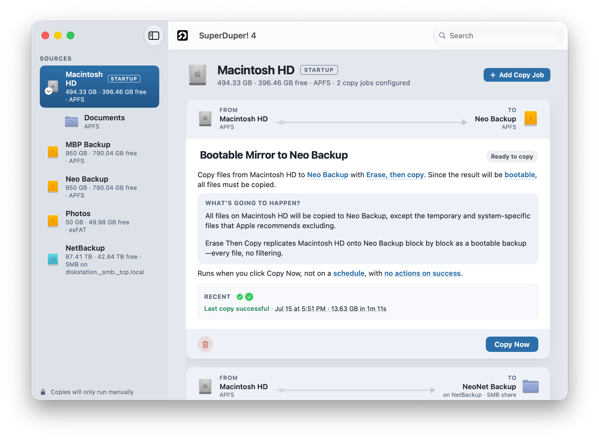
Welcome to SuperDuper! 4
SuperDuper! 4

The new version of SuperDuper is a ground-up rewrite, a tip-to-tail reinvention of what SuperDuper looks like, how it works, what it can do, and where I can take it in the future.

The new version feels different, yet familiar. The successful elements of SuperDuper’s design, like What’s going to happen? and the status view, are still there, but they’ve been refreshed and modernized.

Documents have been retired and replaced with Copy Jobs, which are stored internally and organized by source. If you want to copy Macintosh HD, that’s where you start. Click, and you’re presented with one or more template copy operations, or you can start from scratch.

Configuration is done right inline by clicking bold, underlined link elements and selecting options from pop-ups. The effect of your choices is immediately reflected in What’s going to happen?, ensuring you know what to expect when you click Copy Now.

Preview

And if you’re still unsure, you can safely see what’s going to happen…for real. Click the Preview button and SuperDuper will run the copy without making changes and present you with a report that shows exactly what would have been updated, added, deleted, etc., had this been a real run.

Blazing Speed!

Once you decide it’s time to make the copy, SuperDuper 4 is much faster than before. And I’m not just talking 20% or 30% faster. Smart Updates are between 2x and, with the new Turbo feature, an order of magnitude faster.

As an example, my typical nightly Smart Update, of an 8-million-file volume, about 2.5TB of data, used to take around 40 minutes to run.

Without Turbo, it now takes about 20 minutes. But with Turbo…it’s only about a minute.

One minute. OK, yes, sticklers—that’s actually quite a bit more than an order of magnitude. ¯\_(ツ)_/¯

History

Successful and failed runs are shown at the bottom of the copy job, with color-coded dots that can be clicked to display details.

If scheduled, a clear indication of when the next run will occur is there as well. And for those going for the Guinness Book of Backup Records, there’s an indication of how many successful runs this job has done in a row.

No UI Needed

At a technical level, SuperDuper has been split into a “helper” or “server”, which runs the copy, and an interface, which is the part you interact with. That means that, once registered, you can quit the SuperDuper application and your backups will still run. They’ll even run if you log out!

It also means that a scheduled copy doesn’t suddenly show the interface. It just happens, in the background.

If a copy is in progress, re-opening the app will show you the status and progress of the copy—and while a copy is going on, a menu bar item is present to show a compressed view of the same information.

Many Copies at Once

You can run any number of copies at the same time. If you have four backups you need to do, just click Copy Now for each, and they’ll all run simultaneously.

Have four backups scheduled to run at 4am? They’ll all run at that time, rather than back to back.

File Systems and Folders

SuperDuper 4 now supports copying to and from any file system the Mac supports. Using a “Photos” drive with both Windows and Mac that’s formatted as exFAT? No problem: you can copy it.

Need to copy your Documents folder to “Documents Backup” on a NAS? Now you can.

Have a network volume that you want to copy to a local folder? SuperDuper 4 can do it.

Copy Rules

Copy Scripts have been replaced by Copy Rules. Now, you can easily create rules that can select files and folders from the source or destination for special handling. Need to ensure that a specific folder is never written to or deleted? You can do that with a few clicks.

Want to exclude any folder named Caches in /Library? No problem. And you can see the effect of your rule as you create it, so you can be sure you’ve done the right thing.

No More Shell Scripts

I’ve added Shortcuts support, so you can create a shortcut that runs before or after a copy, on success, or on error. Want to send an email on success or failure? Beep when copies are done? It’s now easy, and with Golden Gate’s Apple Intelligence shortcut support, anyone can do it.

Or, at least, probably anyone.

And if you still want to run a shell script, you can…from the shortcut.

Speaking of Shortcuts

Not only does SuperDuper let you call a shortcut from a copy—you can create, run, and check on a copy job from a shortcut!

If you have an unusual workflow—say, you want to copy any SD card with photos on it to a folder named after that card—you can now do it with a few clicks.

…And So Much More

This is already (much) too long, but there’s so much new stuff that I’ve been wanting to show you. I hope you’re as excited to use this as I am to get it into your hands after all this time.

System Requirements

SuperDuper 4 requires macOS 14 (Sonoma) or later. SuperDuper 3 is still available for those who need to copy under macOS 13 (Ventura) or earlier.

Upgrades

In all the years SuperDuper has been on the market, we’ve never charged for updates and never even raised the price. That’s 22 years of free updates.

SuperDuper 4 is a totally new version, far more capable than before, and as such, I’ve decided this is going to be its first paid upgrade. I’ve also adjusted the price for inflation since 2004. So it’s still the same bargain it was back when it was first released, but in today’s dollars.

SuperDuper 4 is free for qualifying recent purchases. Other SuperDuper 3 customers who purchased after July 31, 2020, receive an upgrade discount of up to 30%, based on purchase date.

As before, even without a license, you can make full, bootable backups for free, and I (yes, it’s really me, I work too much) provide support for both registered and unregistered users.

Dinner’s Served

I’ve been looking forward to this day for a long time, and now that the day has finally arrived, I’m excited to see what you think. Reach out to support if you have any questions, praise, or, if you must, complaints.

And please register or upgrade! The only way I can continue to do this is with your financial support. If you like SuperDuper, share the love and tell your friends!

With that:

Download SuperDuper 4